image
Screenshots
See It In Action
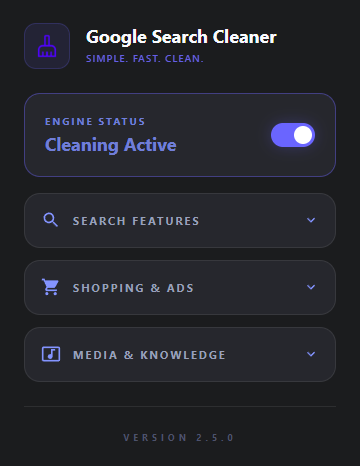
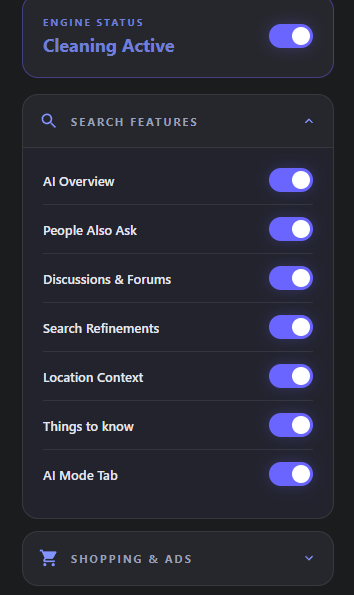
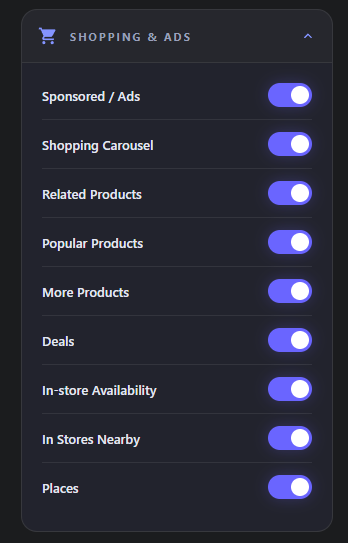
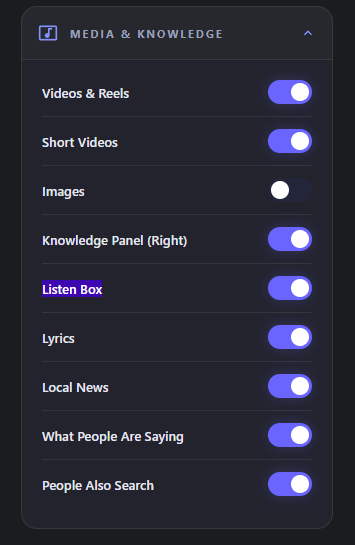
Remove Google AI Overview, ads, and clutter. 25 toggleable filters give you complete control over your search results.
Search Cleaner is a free Chrome extension that removes unwanted elements from Google Search results, giving you back the clean, link-focused experience Google used to provide. It targets the growing list of distractions that now fill search pages: AI-generated overviews, sponsored ads, shopping carousels, People Also Ask boxes, video sections, knowledge panels, and more. With 25 individual toggles organized into three categories, you control exactly what stays and what goes. The extension runs entirely on your device with zero data collection and no external servers. It uses a lightweight MutationObserver engine that applies your preferences in real time, so changes take effect instantly without reloading the page. Whether you are a researcher who needs clean results, a developer tired of scrolling past AI summaries, or anyone who values a distraction-free search experience, Search Cleaner puts you back in control.
Six core capabilities that put you in control of your Google Search experience.
Hide sponsored results and sidebar ads that clutter your search page. Get straight to the organic results without commercial distractions.
Remove Google's AI-generated summaries that push real results below the fold. Enabled by default so you see links first from the moment you install.
Hide shopping carousels, product listings, deals sections, and related product suggestions that Google injects into informational searches.
Remove People Also Ask, Discussions & Forums, related searches, and other expandable sections that bloat the results page.
Granular control over each element type. Enable or disable any of the 25 filters independently to build the exact search layout you want.
Changes apply without page reload thanks to a MutationObserver engine. Toggle a filter and watch the element disappear or reappear in real time.
Every element Google adds to search results can be individually toggled off. Here is the complete list, organized by category.
7 filters
9 filters
9 filters
Search Cleaner is a free Chrome extension that removes unwanted elements from Google Search results, including AI overviews, sponsored ads, shopping carousels, People Also Ask boxes, and more. It provides 25 individual toggles so you can customize exactly which elements to hide.
Yes, Search Cleaner is completely free with no premium tier, no in-app purchases, and no subscriptions. All 25 filters are available to every user at no cost.
Yes. The AI Overview filter is one of 25 toggles available in Search Cleaner, and it is enabled by default. Once installed, Google's AI-generated summary boxes are automatically hidden from your search results.
Search Cleaner hides sponsored results and sidebar ads that appear on Google Search result pages. It uses CSS-based hiding to remove ad elements from the page layout. It does not affect ads on other websites or within other Google products like YouTube or Gmail.
No. Search Cleaner is designed exclusively for Google Search result pages (google.com/search). It does not run on Bing, DuckDuckGo, Yahoo, or any other search engine.
No. Search Cleaner uses a MutationObserver to apply changes in real time. When you toggle a filter on or off, the change takes effect immediately on the current page without requiring a reload.
No. Search Cleaner operates 100% locally on your device. It does not collect, store, or transmit any personal data, search queries, browsing history, or analytics. The extension makes zero network requests and has no external servers.
Only the AI Overview filter is enabled by default. All other 24 filters are turned off when you first install the extension, giving you full control to enable only the filters you want.
“Finally, Google Search looks like it used to. I turned on five filters and the difference was immediate. No more AI summaries taking up half the page. This is exactly what I needed for my research workflow.”
Lisa Thompson
Researcher
“I use Google Search dozens of times a day for content ideas. Removing the shopping carousels and People Also Ask boxes gives me so much more screen space for actual results. The individual toggles are a nice touch.”
Robert Kim
Content Creator
“As a student, I need to find primary sources quickly without wading through AI-generated answers that might be inaccurate. Search Cleaner strips all of that away. It was working the second I installed it.”
Amanda Foster
Student
“I audit SERPs all day and the clutter makes it harder to see what is actually ranking. Search Cleaner lets me strip everything down to the ten blue links when I need to. Great for competitive analysis.”
Derek Hansen
SEO Specialist
“The fact that it collects zero data is a big deal for me. I work with sensitive topics and the last thing I want is another extension phoning home. Search Cleaner is entirely local. Exactly what journalists need.”
Megan Liu
Journalist
“Clean implementation. MutationObserver approach is smart because it catches dynamically loaded elements too. I looked at the source and it is well-written, minimal permissions, no network calls. Respect.”
Ryan O'Brien
Software Developer
Install Search Cleaner and remove Google AI Overview, ads, and clutter in seconds. Free, private, and instant.
Add to Chrome — Free