Chrome extension
AI Image Detector
Detect AI-generated images instantly. Scans EXIF, IPTC, XMP & C2PA metadata locally — 100% private. Supports Midjourney, DALL-E, Stable Diffusion & 30+ tools.
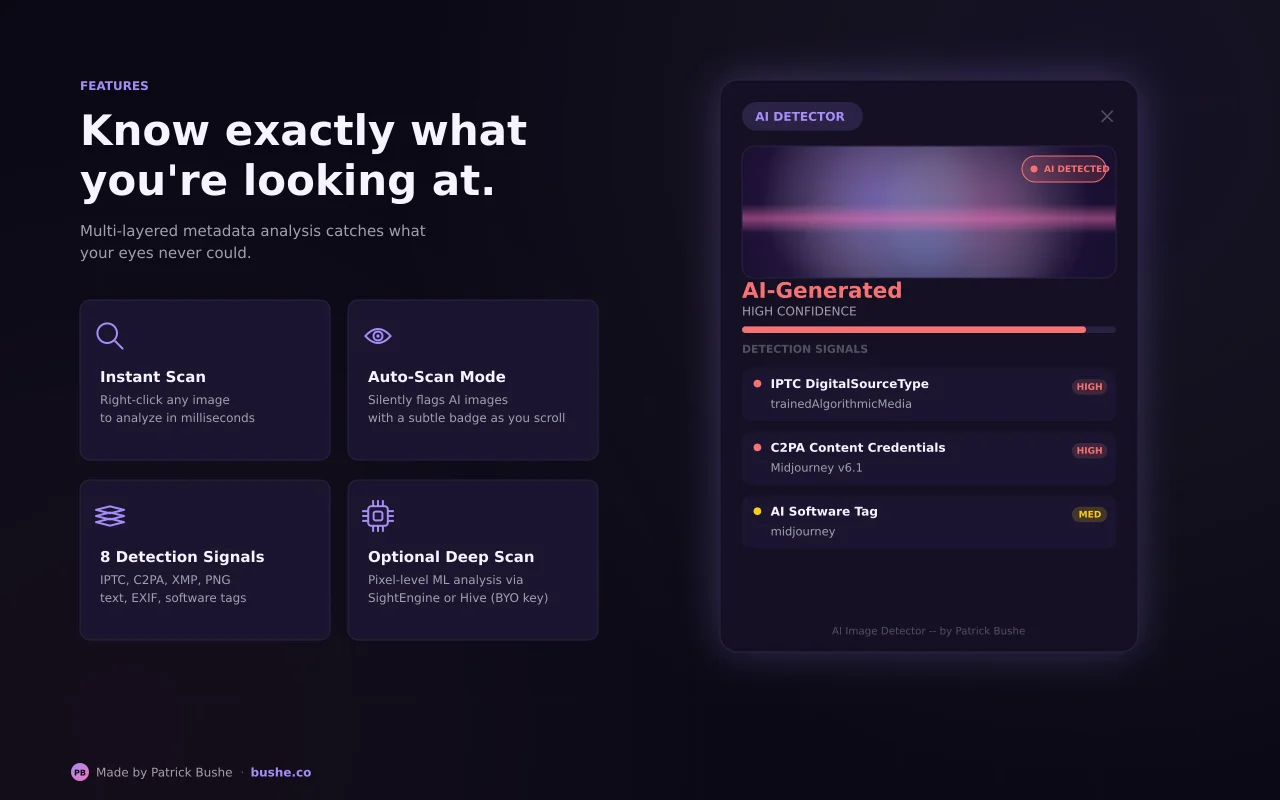
AI Image Detector is a free Chrome extension that empowers you to instantly uncover whether an image was created by Artificial Intelligence or a human photographer. As AI generators like Midjourney, DALL-E 3, and Stable Diffusion become increasingly hyper-realistic, it is harder than ever to trust your eyes. This extension analyzes embedded metadata — EXIF, IPTC, XMP, C2PA, and PNG text chunks — to detect hidden signatures left by major AI generators. All metadata scanning happens 100% locally on your device — no uploads, no tracking. For images stripped of metadata, enable the optional Deep Scan feature for pixel-level AI analysis via SightEngine or Hive Moderation.
Key Features
Everything you need to maximize your productivity and workflow.
Metadata Parsing
Reads EXIF, IPTC, XMP, C2PA, and PNG text chunks to detect AI signatures from 30+ generators.
Auto-Scan
Automatically scans images as you scroll and adds glowing badges on AI-generated images.
Deep Scan
Optional pixel-level AI analysis via SightEngine or Hive Moderation APIs.
30+ AI Tools
Recognizes Midjourney, DALL-E, Stable Diffusion, ComfyUI, Adobe Firefly, and more.
Sensitivity Modes
Choose Strict, Balanced, or Lenient detection to control false positive tolerance.
Privacy First
100% local metadata scanning. No accounts, no tracking. Deep Scan is opt-in only.
How to use AI Image Detector
- 1
Add AI Image Detector to Chrome from the Chrome Web Store.
- 2
Browse normally. Images are checked as you scroll.
- 3
A badge appears on images whose metadata shows they came from an AI generator.
- 4
Choose strict, balanced, or lenient sensitivity to control false positives.
- 5
Turn on Deep Scan only if you want an optional pixel-level check through a third-party service.
AI Image Detector vs the alternatives
Other ways to do the same job, and where each one fits.
Content Credentials Verify
The Content Credentials project's site reads C2PA data for one uploaded image at a time.
Online AI image detectors
Analyze pixels, but usually need you to upload the image.
Reverse image search
Finds where else an image appears, which helps judge where it came from.
AI Image Detector guides
How-tos and explainers from the blog.
AI Image Detector for Journalists and Newsrooms: A Practical Playbook
News teams need fast image verification. Here is a repeatable process for using AI image detection in breaking news and daily editorial workflows.
How Ecommerce Teams Can Spot AI Product Photos Before They Hurt Conversions
AI product images can boost speed but also create trust issues when details do not match the real item. Here is a practical QA process for online stores.
A Teacher's Guide to Checking AI-Generated Images in Student Work
Educators increasingly see AI-generated visuals in assignments. This guide covers a fair, evidence-based approach to reviewing student image submissions.
Real vs AI Images for Brand Marketing: When to Use Each
Should your team use AI images or real photography for campaigns? Use this decision framework to balance speed, brand trust, and performance.
How to Detect AI Images Before You Share Them | Bushe.co
A practical workflow for checking whether an image is AI-generated before reposting it on social media, in newsletters, or in client deliverables.
Frequently Asked Questions
Everything you need to know about AI Image Detector.
What is AI Image Detector?
A free Chrome extension that analyzes images for signs of AI generation using embedded metadata (EXIF, IPTC, XMP, C2PA) and optional pixel-level AI analysis.
Is it free?
Yes, completely free. All metadata scanning works without any account or payment. Optional Deep Scan requires your own API credentials from free-tier providers.
How does it detect AI images?
It uses 8 detection signals including IPTC DigitalSourceType, software field matching against 30+ AI tools, PNG generation parameters, C2PA Content Credentials, and camera data heuristics.
Does it work on social media?
Social media often strips metadata. Enable the optional Deep Scan for pixel-level analysis that works even on screenshots and stripped images.
Does it collect data?
No. All metadata scanning is 100% local. The only time an image leaves your browser is if you explicitly use the opt-in Deep Scan feature.
What AI generators can it detect?
Over 30 including Midjourney, DALL-E, Stable Diffusion, ComfyUI, Automatic1111, Adobe Firefly, Leonardo AI, Flux, Ideogram, NovelAI, Runway, Pika, and more.
Can it tell if every AI image is AI?
No tool can. Metadata checks are reliable when the data is there, but it is often stripped when images are re-saved or shared on social media.
Does it upload my images?
Not by default. Metadata scanning runs locally. Deep Scan sends images to a third-party service only if you turn it on.
Ready to Get Started?
AI Image Detector is free, installs in seconds, and has no account to sign up for.
Add to ChromeNeed a custom extension for your business? I build Chrome extensions for clients too.