Chrome extension
Search Cleaner
Free Chrome extension that removes Google AI Overviews, sponsored results, and clutter from search pages. See only organic results instantly.

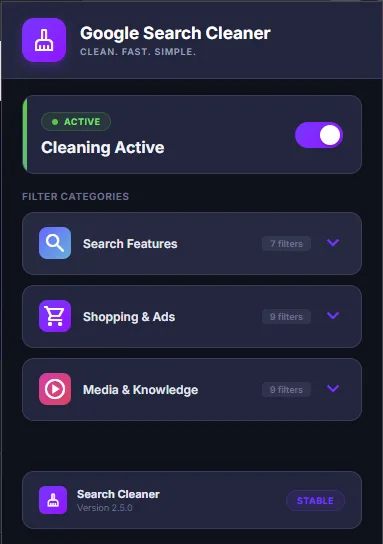
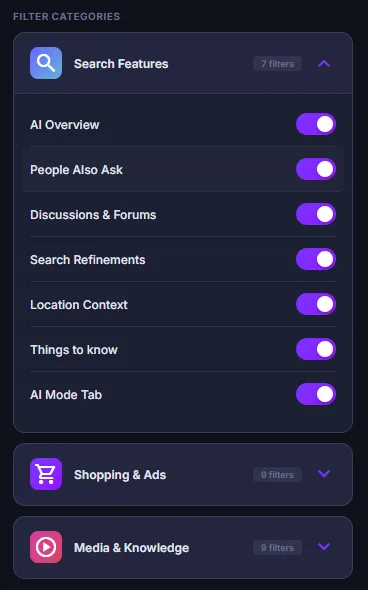
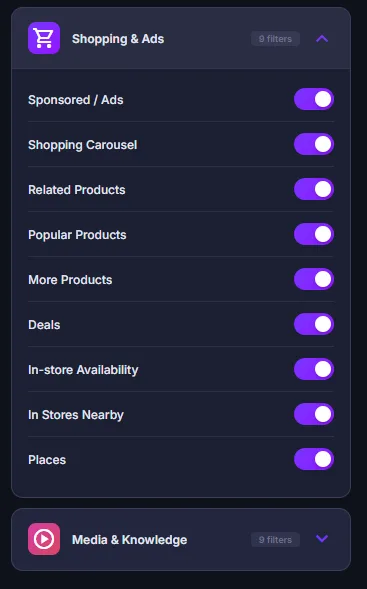
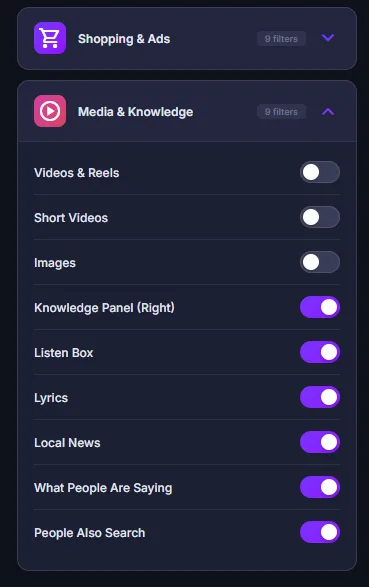
Search Cleaner is a free Chrome extension that provides 25 individual toggle switches to remove unwanted elements from Google Search results pages. Users can selectively hide Google AI Overviews, sponsored ads, shopping carousels, People Also Ask boxes, knowledge panels, related searches, and more. Changes apply instantly without reloading the page. Each toggle controls a specific element type, giving granular control over the search experience. The extension uses CSS injection and MutationObserver to handle dynamically loaded content. 100% local processing with zero data collection.
Key Features
Everything you need to maximize your productivity and workflow.
Ad Removal
Hide sponsored results and sidebar advertisements from your search page.
AI Overview Blocker
Remove Google's AI-generated summaries to see organic results first.
Shopping Filter
Hide shopping carousels, product listings, and "Deals" sections.
Clutter Control
Remove "People Also Ask", discussions, forums, and related searches.
25 Individual Toggles
Granular control over exactly which elements to show or hide.
Instant Effect
Changes apply immediately without reloading the page.
How to use Search Cleaner
- 1
Add Search Cleaner to Chrome from the Chrome Web Store.
- 2
Search on Google as usual: AI Overviews and sponsored results are hidden right away.
- 3
Click the extension icon to see all 25 toggles.
- 4
Turn on or off the elements you want hidden, like People Also Ask, shopping carousels, or discussions.
- 5
Changes apply instantly, without reloading the page.
Search Cleaner vs the alternatives
Other ways to do the same job, and where each one fits.
Google's Web filter
The Web tab under the search box shows plain links, but you have to click it on every search.
Ad blockers like uBlock Origin Lite
Block ads well, but aren't built to remove AI Overviews and the other Google search modules.
Switching search engines
Avoids Google's AI features entirely, but you lose Google's results.
Read the comparison →Search Cleaner guides
How-tos and explainers from the blog.
How to Turn Off Google AI on Android: Search, Chrome, and Gmail (2026)
Complete Android guide to disabling Google AI Overviews, AI Mode, Gemini, and AI lock screen features. Step-by-step for Pixel, Samsung, and other Android phones.
Remove People Also Ask Boxes From Google Search Results
People Also Ask boxes break up Google search results and push organic links further down the page. Here's how to hide them permanently.
How Google AI Overviews Get Answers Wrong and Why That Matters
Why Google's AI Overviews sometimes give wrong answers, the kinds of mistakes they make, how to check an answer in seconds, and how to search without them.
How to Search Google Without Getting AI Answers or Summaries
Get plain Google results without AI Overviews: the Web filter, making it Chrome's default search, and other options when you want links, not summaries.
How Google Autocomplete Suggestions Work and How They Influence You
Where Google's autocomplete predictions come from, why they can steer what you search, and how to remove a suggestion or turn off trending searches.
How to Opt Out of Google Search Personalization
Turn off Google search personalization: the settings switch, the "Try without personalization" link, Web & App Activity, and what Incognito changes.
Visual Showcase
See Search Cleaner in action across different contexts.
Reviews on the Chrome Web Store
Written by Search Cleaner users on its Chrome Web Store listing, copied word for word.
with this you can customize your search experience based on your preferences instead of completely removing everything. It feels flexible rather than restrictive.
This extension honestly made me enjoy using Google Search again.
Great for productivity. I save a lot of links for study, and this makes everything look more organized and easier to manage.
Simple, lightweight, and useful. It removes all the unnecessary "tracking garbage" and leaves you with clean, readable links.
I’ve used similar tools before, but they often mess up the page or leave empty gaps. This one removes elements cleanly, so everything still looks natural.
Frequently Asked Questions
Everything you need to know about Search Cleaner.
Is it free?
Yes — it is completely free, with no paid tiers, subscriptions, or upsells.
Which browsers does it work on?
It is built for Google Chrome and also works on other Chromium-based browsers like Microsoft Edge and Brave.
What does it remove from Google Search?
It removes Google AI Overviews, sponsored/ad results, and shopping clutter, with 25 individual toggles so you control exactly what is hidden.
Does it collect my searches?
No. It works entirely in your browser and collects no data.
How do I get rid of AI Overviews in Google?
Install Search Cleaner and keep the AI Overview blocker on. Google search results then open with regular results at the top.
Can I keep some Google features and hide others?
Yes. Each of the 25 elements has its own toggle, so you can hide ads and AI Overviews but keep, for example, People Also Ask.
Ready to Get Started?
Search Cleaner is free, installs in seconds, and has no account to sign up for.
Add to ChromeNeed a custom extension for your business? I build Chrome extensions for clients too.