Font Detector
Free Chrome extension to identify fonts on any webpage by hovering or clicking. See font name, size, weight, and color instantly. No account needed.
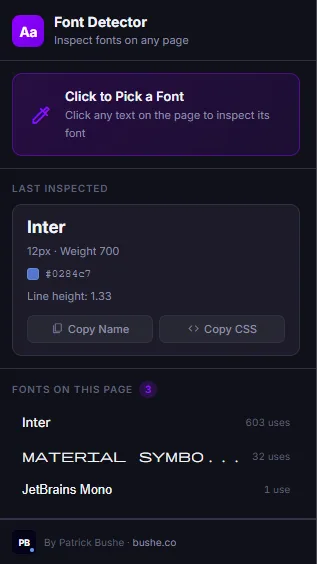
Font Detector is the fastest, cleanest way to identify fonts on any website. Ever land on a page and wonder what font that is? Font Detector gives you the answer in a single click. Activate picker mode, hover over any text element, and a floating tooltip shows you the font name, size, weight, style, line height, and color in real time. Click to capture it. The Last Inspected panel remembers your most recent find with a color swatch, hex code, and one-click copy of the font name or a ready-to-paste CSS font-family snippet. The Page Fonts scanner lists every font in use on the current page, sorted by how frequently each one appears — no more hunting through DevTools computed styles.
Key Features
Everything you need to maximize your productivity and workflow.
Point-and-Click Picker
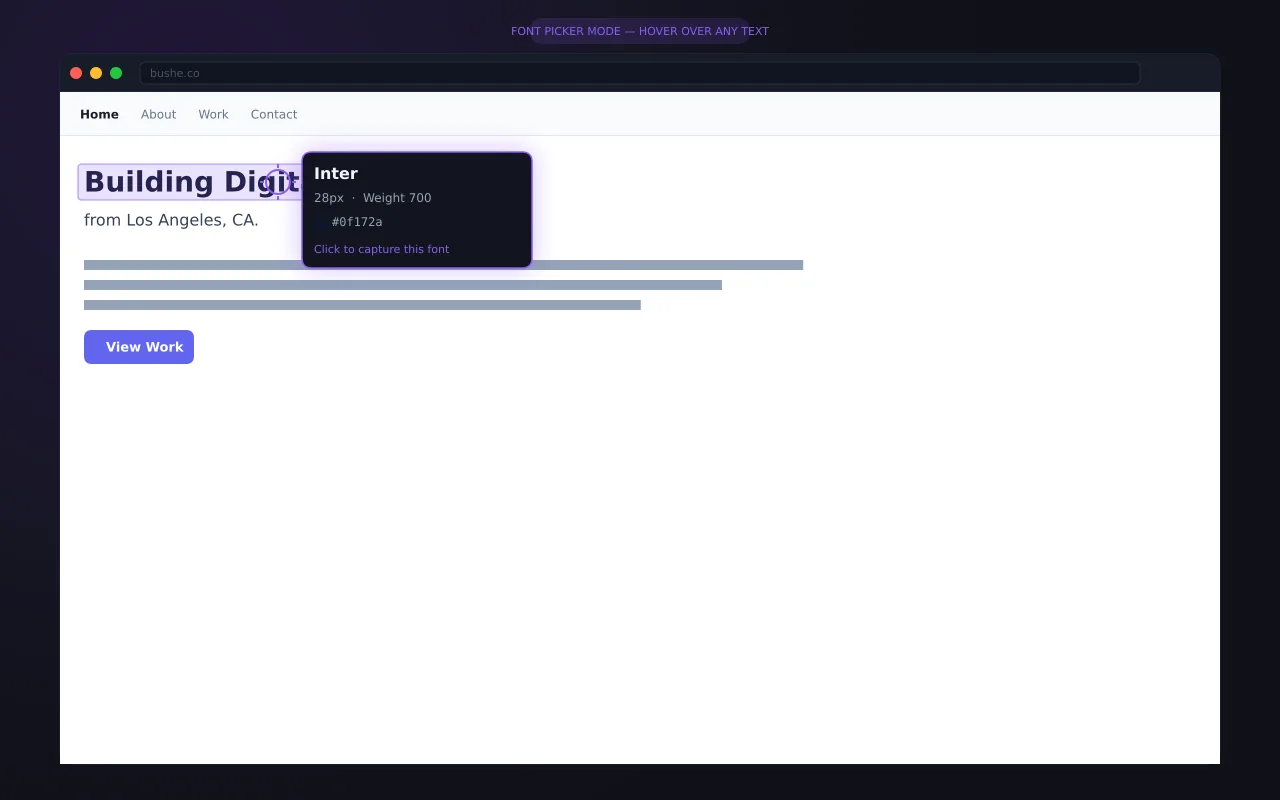
Activate picker mode and hover over any text for a live tooltip showing font name, size, weight, style, and color.
Page Font Scanner
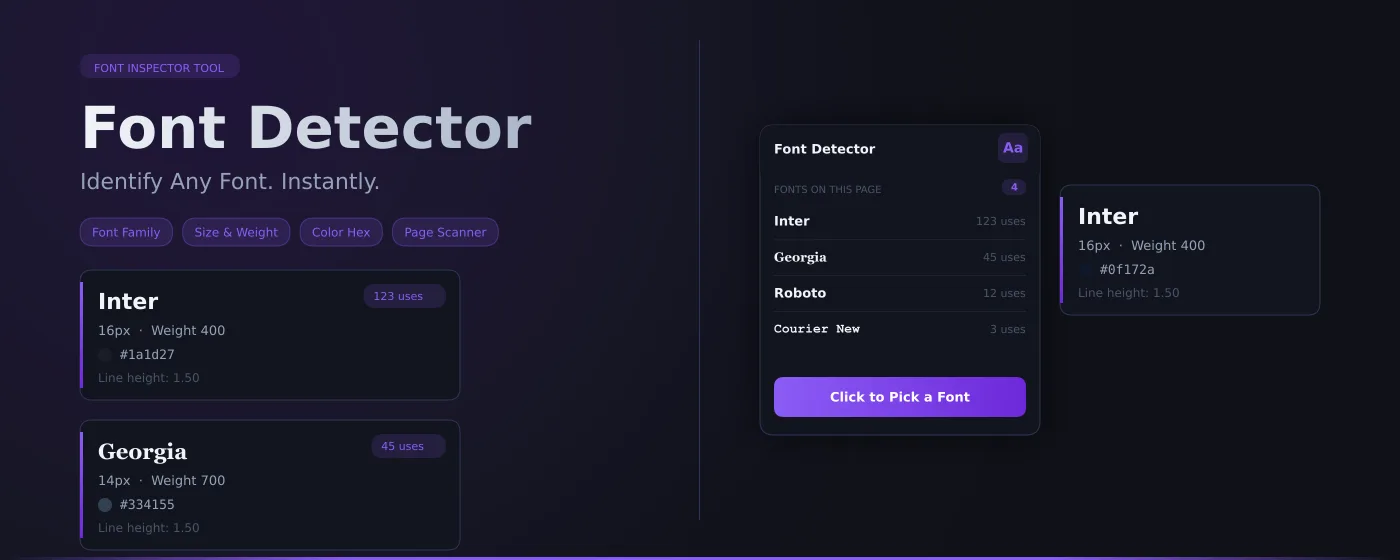
See every font used on the current page ranked by usage count — find the headline font, body font, and everything in between.
Last Inspected Panel
Your most recent font capture is always saved — font name rendered in its own face, color swatch, hex code, all ready to copy.
One-Click Copy
Copy the font name or a complete font-family CSS snippet to your clipboard with a single click.
Color Detection
Every inspection includes the exact text color as a visual swatch and copyable hex code.
100% Private
No page content is recorded or transmitted. Only the last inspected font metadata is stored locally on your device.
How to use Font Detector
- 1
Add Font Detector to Chrome from the Chrome Web Store.
- 2
Open the website and turn on picker mode from the extension.
- 3
Hover over any text to see its font name, size, weight, and color.
- 4
Click to capture it, then copy the font name or a ready-made CSS font-family snippet.
- 5
Use the page scanner to see every font on the page, ranked by how much it's used.
Font Detector vs the alternatives
Other ways to do the same job, and where each one fits.
Chrome DevTools
Inspect an element and check Computed styles and Rendered Fonts. Accurate, but slower for a quick check.
Fonts Ninja
Free. Shows the font name and CSS on hover, plus the foundry and price, and lets you bookmark fonts to try or buy later.
WhatTheFont and image identifiers
Identify fonts in images and logos, which browser tools can't read.
Font Detector guides
How-tos and explainers from the blog.
How to Check if a Website's Font Is Free or Requires a License
Found a font you love on a website? Before you use it, find out if it's free, open source, or requires an expensive license.
How to Find What Font a Website Is Using Without Inspect Element
See a font you love on a website but don't know how to identify it? Here's the easy way — no developer tools required.
How to Identify Fonts on a Website for Your Design Project
Building a moodboard or design system? Here's how to identify and catalog fonts from websites you admire.
How to Identify Any Font on Any Website Without DevTools
You see a beautiful font on a website and want to know what it is. Here's how to identify it instantly without opening developer tools.
How to Build a Typography Moodboard From Real Websites
Font catalogs show you samples. Real websites show you typography in context. Here's how to build a moodboard from sites you admire.
How to Compare Fonts Across Different Websites Side by Side
Trying to decide between two fonts? Compare how they look in real use across different websites instead of relying on sample text.
Visual Showcase
See Font Detector in action across different contexts.
Frequently Asked Questions
Everything you need to know about Font Detector.
Is it free?
Yes — it is completely free, with no paid tiers, subscriptions, or upsells.
Which browsers does it work on?
It is built for Google Chrome and also works on other Chromium-based browsers like Microsoft Edge and Brave.
What details does it show?
Hover or click any text to see its font family, size, weight, and color — and copy the details in one click.
Is it private?
Yes. It runs entirely in your browser and collects no data.
How do I find out what font a website uses?
Turn on Font Detector's picker and hover over the text. It shows the font actually rendered, plus size, weight, and color.
Can it identify fonts in images?
No. It reads live text on the page. For fonts inside images or logos, use an image-based font identifier.
Ready to Get Started?
Font Detector is free, installs in seconds, and has no account to sign up for.
Get Extension Now!Need a custom extension for your business? I build Chrome extensions for clients too.