Modern Dark Mode
Free Chrome extension that applies intelligent dark mode to every website. Reduce eye strain with smart CSS filters, scheduling, and per-site control.

Modern Dark Mode is a free Chrome extension that applies intelligent CSS filter inversion to any website, converting bright pages into comfortable dark themes. Unlike browser-native dark mode, it works on all websites and preserves images, videos, canvas elements, and SVGs in their original colors using a double-inversion technique. Features include scheduled activation with custom start/end times, per-site exclusion lists, adjustable brightness, contrast, sepia, and grayscale controls, and a keyboard shortcut (Alt+Shift+D) for instant toggling across all tabs. The extension is 100% local with zero data collection, no external servers, and no tracking.
Key Features
Everything you need to maximize your productivity and workflow.
Smart Inversion
CSS filter technology that darkens pages while preserving the natural appearance of images and videos.
Schedule Mode
Set custom start and end times to automatically enable dark mode during your preferred hours.
Site Exclusions
Easily exclude specific websites from dark mode with a single click in the popup.
Visual Adjustments
Fine-tune brightness, contrast, sepia, and grayscale to match your preferences.
Keyboard Shortcut
Toggle dark mode instantly across all tabs with Alt+Shift+D.
Privacy First
100% local processing. No data collection, no tracking, no external servers.
How to use Modern Dark Mode
- 1
Add Modern Dark Mode to Chrome from the Chrome Web Store.
- 2
Open any website: it switches to dark mode right away, with images kept looking normal.
- 3
Click the extension icon to fine-tune brightness, contrast, sepia, or grayscale.
- 4
Add sites that already have a good dark theme, or look wrong, to your exclusions with one click.
- 5
Set a schedule so dark mode only turns on in the evening, or press Alt+Shift+D to toggle it on every tab.
Modern Dark Mode vs the alternatives
Other ways to do the same job, and where each one fits.
Dark Reader
The best-known dark mode extension, with more modes and deep customization. Modern Dark Mode aims for a simpler setup with fewer permissions.
Read the comparison →Chrome's force-dark flag
Built in, but it applies to every site with no exclusions or schedule, and it often inverts images.
A site's own dark theme
Always the best result when a site has one. Exclude those sites so the two don't fight.
Modern Dark Mode guides
How-tos and explainers from the blog.
Google Drive Dark Mode: Desktop, iPhone, and Android (2026)
Complete guide to enabling Google Drive dark mode on desktop browsers, iPhone, and Android. Includes the cell-color preservation problem for Sheets and Docs.
How to Turn On Dark Mode on Android: Phone, Apps, Chrome, and Samsung (2026)
Complete Android dark mode guide covering system theme, individual apps, Chrome browsing, Samsung Galaxy AI, and forcing dark on websites that ignore your preference.
How to Turn On Dark Mode on iPhone: System, Apps, Safari, and Chrome (2026)
Complete iPhone dark mode guide covering system-wide dark mode, individual apps, Safari websites, Chrome browsing, and per-app exceptions. Works on iPhone 13, 14, 15, 16, and 17.
How to Turn Off Dark Mode in Word (2026): Mac, PC & Web
Switch Microsoft Word from dark mode back to light on Mac, Windows, and the web in under a minute — plus the trick to keep dark toolbars but a white page.
How to Enable Dark Mode on Websites That Don't Support It
Many websites still don't offer a dark theme. Here's how to force dark mode on any website without breaking the design.
Dark Mode for Canvas LMS Without Breaking Course Content
Dark Mode for Canvas LMS is something every regular internet user should understand. It touches on dark mode advanced guides in ways that directly affect your daily browsing experience — from page load times to privacy to overall comfort.
Visual Showcase
See Modern Dark Mode in action across different contexts.
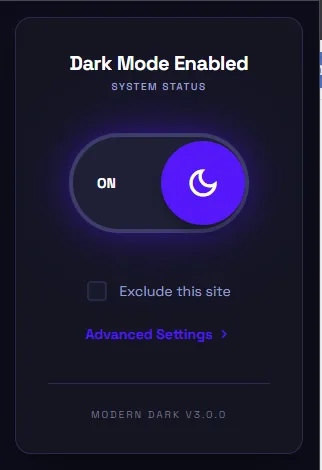
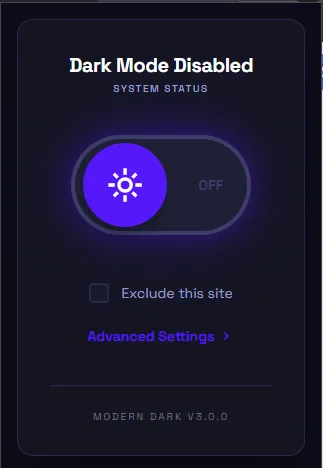
One-Click Toggle
Activate dark mode across all your favorite sites with a single click.
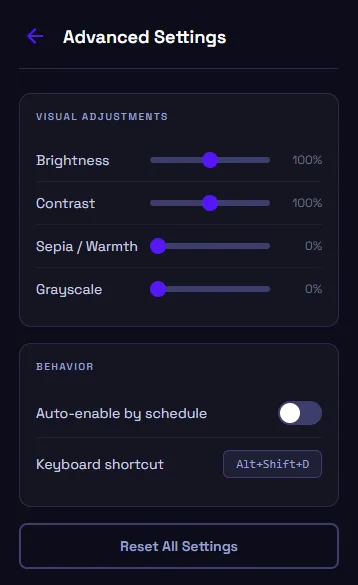
Visual Controls
Adjust brightness, contrast, sepia, and grayscale to your liking.
What Users Say
Hear from people who have transformed their workflow with Modern Dark Mode.

"Simple and effective. My eyes no longer strain during late-night coding sessions."

"Love that it preserves images properly. The schedule feature is great for my workflow."

"Works on every site I visit. The keyboard shortcut makes toggling effortless."

"I work 12-hour days in front of screens. This extension is a lifesaver for my eyes. The scheduled mode turns on automatically every evening."

"Every other dark mode extension breaks image colors or makes sites unreadable. This one just works. Clean, fast, and reliable."

"The per-site exclusion list is clutch. I keep dark mode off for dashboards with charts but on everywhere else. Exactly what I needed."
Frequently Asked Questions
Everything you need to know about Modern Dark Mode.
Is it free?
Yes — it is completely free, with no paid tiers, subscriptions, or upsells.
Which browsers does it work on?
It is built for Google Chrome and also works on other Chromium-based browsers like Microsoft Edge and Brave.
Does it work on every website?
It applies dark mode to virtually any site using smart CSS inversion, and you can exclude specific sites you would rather keep light.
Does it collect my data?
No. Modern Dark Mode runs entirely in your browser and collects no data.
How do I turn off dark mode for one website?
Open the site, click the Modern Dark Mode icon, and add it to your exclusions. Dark mode stays on everywhere else.
Does it change images and videos?
No. Smart inversion darkens the page while keeping images looking natural, so photos and videos are not turned into negatives.
Ready to Get Started?
Modern Dark Mode is free, installs in seconds, and has no account to sign up for.
Get Extension Now!Need a custom extension for your business? I build Chrome extensions for clients too.