Wayback Machine Quick-Access
Free Chrome extension for instant Wayback Machine access. Check if any page is archived, view the latest snapshot, and archive pages in one click.
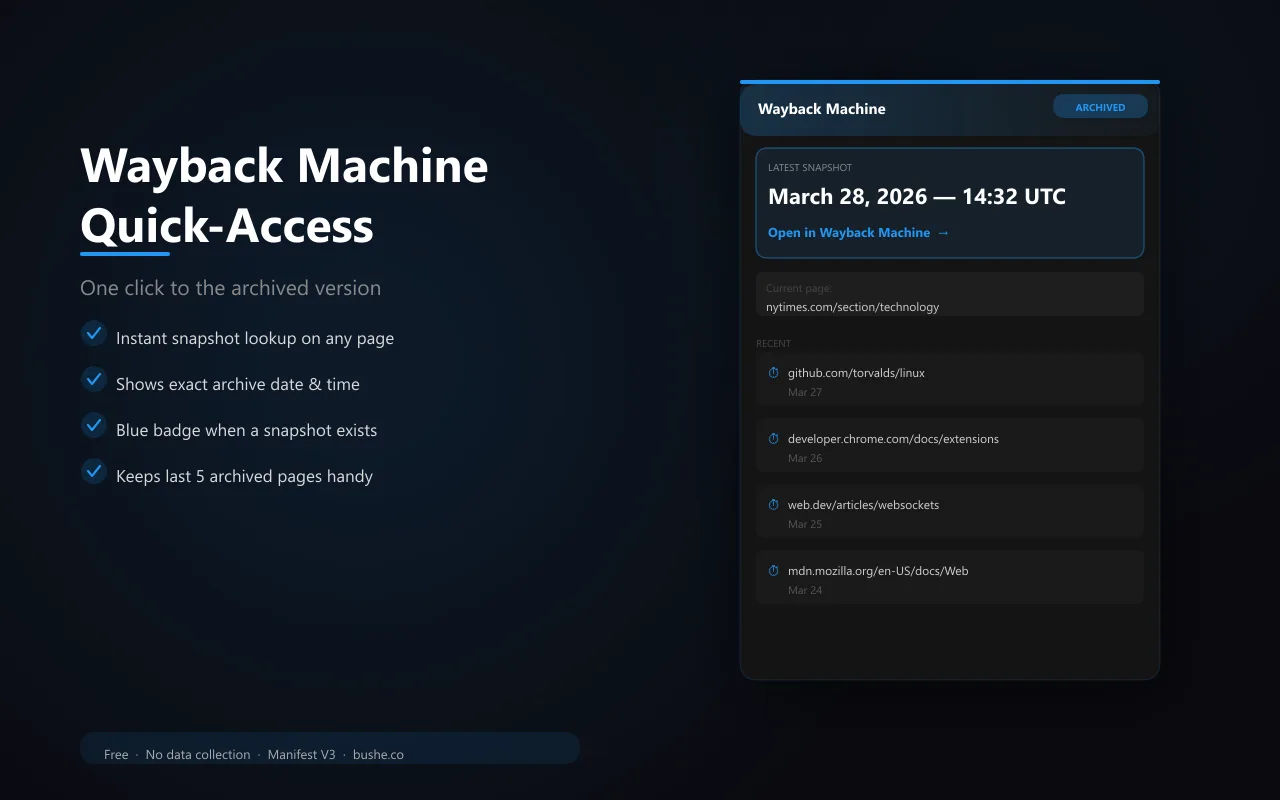
Broken links, deleted pages, changed content — the web forgets things constantly. Wayback Machine Quick-Access puts the full archive one click away. Open the popup on any page and see the date and time of the most recent snapshot. Click to open it in the Wayback Machine. The extension caches results for 5 minutes so repeated opens are instant. A blue badge appears on pages that have been archived. Your last 5 visited archived pages are saved for quick reference. Built on the official Wayback Availability API — no scraping, no workarounds.
Key Features
Everything you need to maximize your productivity and workflow.
Instant Snapshot
Shows the latest archived version of the current page without leaving the tab.
One-Click Open
Jump straight to the Wayback Machine snapshot with a single click.
5-Min Cache
Results are cached for 5 minutes — reopening the popup is instant.
Recent History
Saves your last 5 archived page lookups for quick reference.
Archive Badge
Blue badge appears on the extension icon when the current page has an archived version.
Official API
Uses the official Wayback Machine Availability API — reliable and sanctioned.
How to use Wayback Machine Quick-Access
- 1
Add Wayback Quick Access to Chrome from the Chrome Web Store.
- 2
Browse normally. A blue badge on the icon means the page has an archived version.
- 3
Click the icon to see the latest snapshot date.
- 4
Open the archived copy with one click.
- 5
Use recent history to get back to pages you looked up.
Wayback Machine Quick-Access vs the alternatives
Other ways to do the same job, and where each one fits.
Visiting web.archive.org
Works for any page, but means copying the address and searching every time.
The Internet Archive's own extension
Offers more archive features, including saving pages.
archive.today
A separate archive with its own snapshots, useful when the Wayback Machine has none.
Wayback Machine Quick-Access guides
How-tos and explainers from the blog.
How to Quickly View an Old Version of Any Website
Want to see what a website looked like last month or last year? Here's the fastest way to access archived versions.
How to See Deleted Website Content Using the Wayback Machine
A page was deleted or changed and you need to see the original. Here's how to recover deleted web content quickly.
Quick Way to Check a Website History Without Going to Archive.org
You don't always need to visit archive.org directly. Here's a faster workflow for checking a site's history from any tab.
How Internet Archive Save Page Now Feature Works
Most people overcomplicate this. Internet Archive Save Page Now is actually one of the simplest improvements you can make to your browsing experience, and it is completely free.
How to See What a Website Looked Like 5 Years Ago Instantly
The Wayback Machine has billions of snapshots, but navigating to them takes too many clicks. Here's the fast way to pull up any site's history.
Check if a Deleted Web Page Still Exists on the Wayback Machine
Pages get deleted, domains expire, companies shut down — but the Wayback Machine often has a copy. Here's how to find it quickly.
Visual Showcase
See Wayback Machine Quick-Access in action across different contexts.
Wayback Machine Quick-Access
One-click access to the latest archived version of any webpage.
Frequently Asked Questions
Everything you need to know about Wayback Machine Quick-Access.
What is the Wayback Machine?
The Wayback Machine at archive.org is the largest digital archive of the web, with hundreds of billions of saved pages going back decades.
What if a page isn't archived?
The extension shows a "Not archived" state with an orange badge. You can visit archive.org directly to submit the URL for archiving.
Does it slow down browsing?
No. Lookups are debounced and cached. The API call is lightweight and runs in the background without affecting page load speed.
How do I see an old version of a website?
Open the page and click Wayback Quick Access. If an archived copy exists, it opens the latest snapshot in one click.
What if a page has no archived copy?
The badge won't appear. Try the site's home page or another archive, or check whether the page moved.
Ready to Get Started?
Wayback Machine Quick-Access is free, installs in seconds, and has no account to sign up for.
Add to ChromeNeed a custom extension for your business? I build Chrome extensions for clients too.