WebRTC Privacy Shield
Free Chrome extension that blocks WebRTC IP leaks. Protect your real IP address even when using a VPN. Simple toggle, zero configuration required.
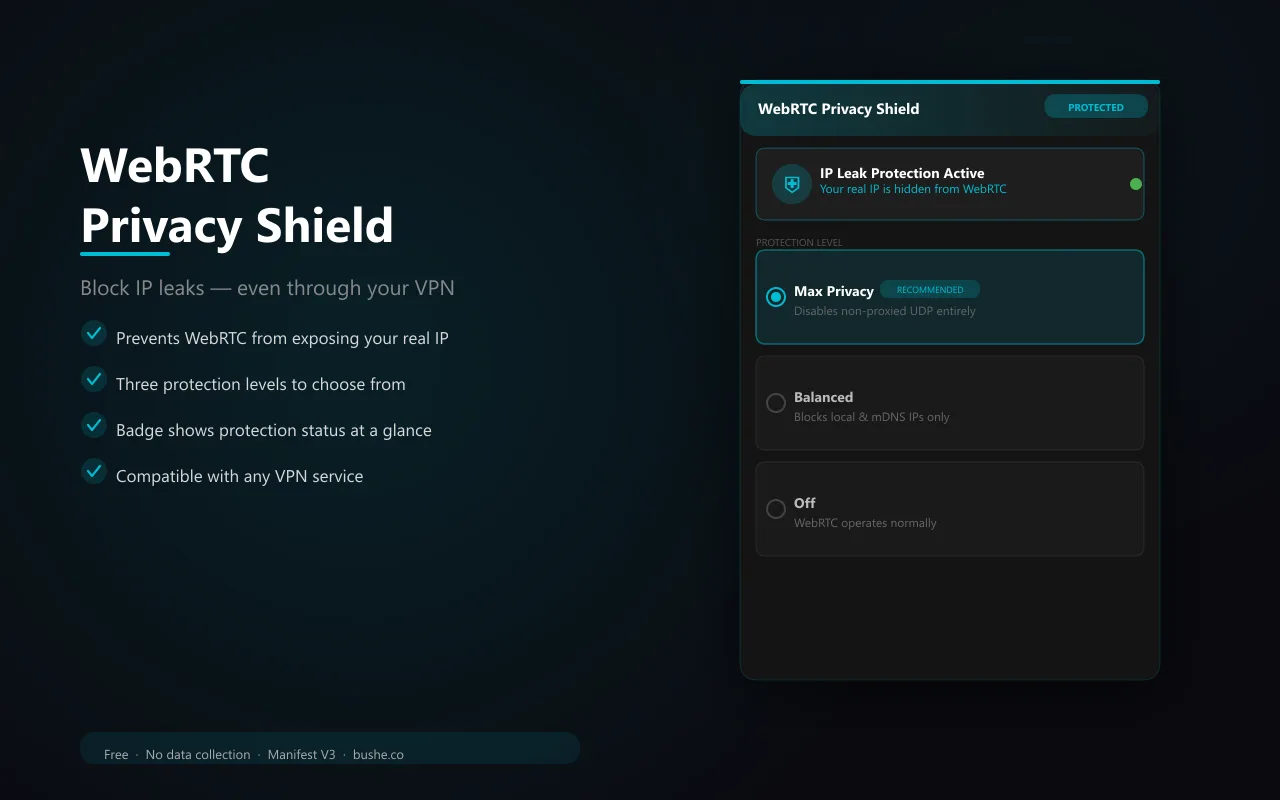
WebRTC is a browser technology that enables real-time communication — but it can leak your real IP address even when you're using a VPN. WebRTC Privacy Shield intercepts this at the API level, letting you choose your protection level. Max Privacy mode completely disables non-proxied UDP so your real IP is never exposed. Balanced mode allows only your default public interface IP — no local or mDNS addresses. Switch it Off temporarily for sites that need WebRTC. The badge turns teal when protected and shows OFF in red when disabled. Your selected level persists across sessions.
Key Features
Everything you need to maximize your productivity and workflow.
Max Privacy
Disables non-proxied UDP entirely — your real IP is never exposed, even through WebRTC.
Balanced Mode
Allows only the default public interface IP — blocks local and mDNS address leaks.
One-Click Toggle
Switch between protection levels instantly from the popup. Badge updates in real time.
VPN-Compatible
Complements any VPN by plugging the WebRTC hole that many VPNs miss.
Status Badge
Teal badge = protected. Red 'OFF' badge = disabled. Always know your protection level.
No Data Collection
Everything runs locally. No servers, no accounts, no tracking.
How to use WebRTC Privacy Shield
- 1
Add WebRTC Privacy Shield to Chrome from the Chrome Web Store.
- 2
It turns on in Max Privacy mode right away: no direct UDP, so your real IP isn't exposed through WebRTC.
- 3
If a video call app has trouble, switch to Balanced mode in the popup.
- 4
Check the badge: teal means protected, red OFF means disabled.
- 5
Run a WebRTC leak test with your VPN on to confirm.
WebRTC Privacy Shield vs the alternatives
Other ways to do the same job, and where each one fits.
VPN browser extensions
Some include WebRTC protection. Check yours; many VPN apps don't cover the browser.
Chrome launch switches and policies
The same setting is available through a command-line switch or company policy, which is awkward for everyday use.
WebRTC Leak Shield
Several extensions share this name, from different publishers, so check who makes the one you install. If video calls break with one, WebRTC Privacy Shield’s Balanced mode keeps most calls working.
Disabling WebRTC entirely
Breaks video calls. Balanced mode keeps most calls working.
WebRTC Privacy Shield guides
How-tos and explainers from the blog.
Privacy-Focused Browser Comparison: Chrome vs Brave vs Firefox in 2026
Choosing between these options is not as straightforward as most comparison articles suggest. The right choice for chrome vs brave vs firefox privacy depends on your specific workflow, priorities, and how you actually use your browser day to day.
How to Block WebRTC in Chrome Without Breaking Video Calls
Blocking WebRTC entirely breaks video calls. The right approach disables IP leaks while keeping real-time communication working. Here's how.
How to Fix WebRTC Leak in Chrome Edge and Brave Browser
WebRTC leaks work differently across browsers. Here's the right fix for Chrome, Edge, and Brave — each has a different approach.
Top 10 Privacy-Focused Chrome Extensions in 2026 (Tested with Real Network Traffic)
SEO Title: Top 10 Privacy-Focused Chrome Extensions in 2026 (Tested) Meta Description: Ten Chrome privacy extensions tested with real network capture in...
DNS Leak Test: How to Check if Your Browsing History Is Exposed
A DNS leak occurs when your DNS queries — the requests that translate website names like google.com into IP addresses — bypass your VPN or proxy and go directly to your ISP's DNS servers, exposing every website you visit. Even if you are using a V...
How to Fix WebRTC IP Leak When Using a VPN in Chrome
Your VPN might be hiding your IP address, but WebRTC could be exposing it anyway. Here's how to fix the leak without breaking video calls.
Visual Showcase
See WebRTC Privacy Shield in action across different contexts.
WebRTC Privacy Shield
Three protection levels. One click. Badge shows status at all times.
Frequently Asked Questions
Everything you need to know about WebRTC Privacy Shield.
What is a WebRTC leak?
WebRTC is used for video calls and real-time features. It can expose your real IP address to websites even when you're using a VPN, because it bypasses the VPN tunnel.
Will this break video calls?
Max Privacy may affect some WebRTC-based video calls. Use Balanced mode for protection that keeps video calls working, or toggle Off temporarily on call sites.
Does it work with my VPN?
Yes. WebRTC Privacy Shield complements any VPN by closing the WebRTC leak that most VPNs don't address.
How do I stop WebRTC from leaking my IP in Chrome?
Install WebRTC Privacy Shield. Max Privacy mode stops direct UDP connections, and Balanced mode only allows your public interface.
Is there a Chrome flag for WebRTC loopback candidates?
No. Chrome already leaves loopback addresses out. The real control is the WebRTC IP handling policy, which this extension sets.
Ready to Get Started?
WebRTC Privacy Shield is free, installs in seconds, and has no account to sign up for.
Add to ChromeNeed a custom extension for your business? I build Chrome extensions for clients too.