Blue Light Filter
Free Chrome extension that applies a warm amber overlay to reduce blue light. Protect your eyes at night. Adjustable intensity and scheduling.
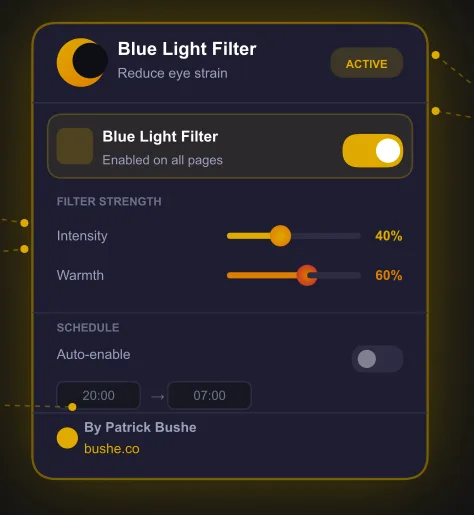
Blue Light Filter adds a smooth, warm amber overlay to every webpage you visit — reducing the harsh blue light emitted by your screen and helping your eyes feel relaxed no matter how long you browse. Modern screens blast blue light at your eyes all day. By evening, that exposure suppresses melatonin production, strains your eyes, and leaves you wired when you should be winding down. Dial the intensity from 0% to 100%, tune the warmth from soft amber to deep orange-red, and set an overnight schedule so the filter switches on and off automatically. Zero accounts. Zero tracking. Just comfortable browsing.
Key Features
Everything you need to maximize your productivity and workflow.
One-Click Toggle
Enable or disable the filter instantly from the toolbar popup with a single click. No setup required.
Adjustable Intensity
Dial the filter strength from 0% to 100% to find your perfect level of eye protection.
Warmth Control
Slide from soft amber to deep orange-red to match your preference and the time of day.
Auto-Schedule
Set a start and end time and the filter activates automatically — overnight schedules like 8 PM to 7 AM work correctly.
Works Everywhere
Injected before content renders so there is no flash of harsh light. Works on all sites including SPAs.
100% Private
No accounts, no servers, no tracking. All six settings are stored locally on your device and nowhere else.
How to use Blue Light Filter
- 1
Add Blue Light Filter to Chrome from the Chrome Web Store.
- 2
Click the extension icon and turn the filter on.
- 3
Set the intensity and warmth until pages feel comfortable.
- 4
Add a schedule so it turns on in the evening and off in the morning, including overnight schedules.
- 5
Leave it running: it applies before pages render, so there's no flash of bright white.
Blue Light Filter vs the alternatives
Other ways to do the same job, and where each one fits.
Night Light and Night Shift
Built into Windows and macOS and cover the whole screen. Blue Light Filter works inside Chrome with its own intensity and schedule.
Dark mode
Cuts brightness rather than warming colors. Many people use both at night.
Desktop apps like f.lux
Adjust the whole screen automatically by time of day, but need a separate app install.
Blue Light Filter guides
How-tos and explainers from the blog.
Night Shift vs Blue Light Filter Extension: Which Actually Reduces Eye Strain
Choosing between these options is not as straightforward as most comparison articles suggest. The right choice for night shift vs blue light filter depends on your specific workflow, priorities, and how you actually use your browser day to day.
Best Chrome Extensions for Reducing Screen Time
With hundreds of options in the Chrome Web Store, identifying the best extensions reducing screen time takes serious research. We did that research so you do not have to — testing each option across multiple websites and use cases.
Best Blue Light Filter for Coding at Night Without Glasses
Coding late at night? Here's how to reduce blue light from your screen without buying special glasses or installing desktop software.
How to Reduce Blue Light on Your Screen Without Installing Software
Don't want to install desktop software just to reduce blue light? Here's a lighter approach that works directly in your browser.
Does Blue Light From Screens Actually Affect Your Sleep?
The science behind blue light and sleep is more nuanced than most articles suggest. Here's what the research actually says.
Best Blue Light Filter Settings for Evening Browsing
Not all blue light filter settings are equal. Here's how to configure warmth, timing, and intensity for maximum comfort without making everything orange.
Frequently Asked Questions
Everything you need to know about Blue Light Filter.
Is it free?
Yes — it is completely free, with no paid tiers, subscriptions, or upsells.
Which browsers does it work on?
It is built for Google Chrome and also works on other Chromium-based browsers like Microsoft Edge and Brave.
What does it actually do?
It applies an adjustable warm amber overlay to reduce blue light, with intensity and warmth controls and an optional auto-schedule for nighttime.
Is it private?
Yes — it works entirely in your browser and collects no data.
Should I use a blue light filter and dark mode together?
They do different jobs. Dark mode reduces overall brightness and the filter warms colors, so a light filter plus dark mode works well at night.
Does it affect screenshots or colors?
It changes how colors look on screen while it is on. Turn it off for color-critical work like photo editing.
Ready to Get Started?
Blue Light Filter is free, installs in seconds, and has no account to sign up for.
Get ExtensionNeed a custom extension for your business? I build Chrome extensions for clients too.