AutoBrowser
Free Chrome extension for hands-free browsing. Auto-scroll pages, rotate through tabs on a timer, and run URL playlists. Perfect for dashboards and kiosks.

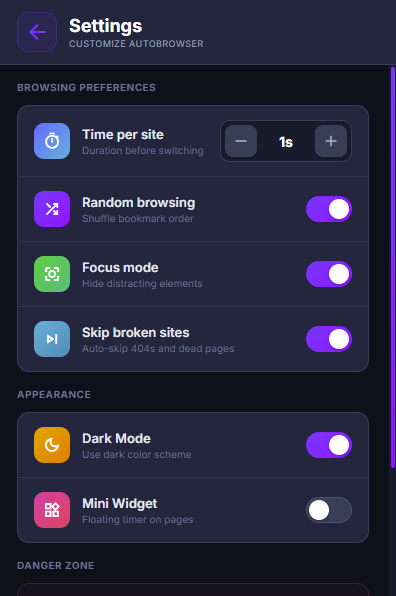
AutoBrowser is a free Chrome extension that transforms bookmark folders into automated browsing sessions. Users select folders, set a timer interval between 1 and 300 seconds per site, and the extension cycles through saved bookmarks automatically. It features smart folder selection, broken link detection that flags dead bookmarks, random shuffle mode, a floating control widget for pause/resume/skip, and detailed session statistics. Common use cases include digital signage displays, dashboard monitoring, automated testing workflows, and hands-free browsing. The extension operates 100% locally with zero data collection.
Key Features
Everything you need to maximize your productivity and workflow.
Folder Selection
Choose specific bookmark folders to browse, with search and hierarchical selection.
Configurable Timer
Set how long to stay on each site, from 1 second to 5 minutes per page.
Random Mode
Shuffle your bookmarks for variety, with smart tracking to ensure full coverage.
Broken Link Detection
Automatically detects and skips 404 errors, dead pages, and unresponsive sites.
Floating Widget
Draggable mini-controller shows timer, visit count, and pause/stop controls on every page.
100% Local
No accounts, no servers, no data collection. Everything stays in your browser.
How to use AutoBrowser
- 1
Add AutoBrowser to Chrome from the Chrome Web Store.
- 2
Put the sites you want to cycle through into a bookmarks folder.
- 3
Open AutoBrowser and select that folder.
- 4
Set how long to stay on each page, from 1 second to 5 minutes, and turn on random order if you like.
- 5
Press start. The floating widget shows the timer and visit count, with pause and stop controls.
AutoBrowser vs the alternatives
Other ways to do the same job, and where each one fits.
Chrome's startup pages
Opens a fixed set of pages when Chrome starts, but doesn't rotate between them or keep them moving.
Auto-refresh extensions
Reload one tab on a timer. AutoBrowser moves through a whole list of sites instead.
Scripting tools like Playwright or Selenium
Handle complex automation, but need code. AutoBrowser is point-and-click.
AutoBrowser guides
How-tos and explainers from the blog.
How to Auto Refresh a Webpage Every 30 Seconds in Chrome
Chrome doesn't have a built-in auto-refresh option. Here are the real ways to set a tab to refresh on a schedule without keeping a terminal open.
How to Keep a Web Session Alive Without Manually Clicking
The good news is that keep web session alive chrome is straightforward once you know the right approach. You do not need technical expertise, and the entire process takes less than ten minutes with the right tools.
How to Auto-Scroll a Web Page to the Bottom Without Touching the Mouse
Most people overcomplicate this. Auto Scroll Web Page Chrome is actually one of the simplest improvements you can make to your browsing experience, and it is completely free.
How to Auto-Open Specific URLs Every Morning When You Start Chrome
Here is the direct answer: auto open URLs chrome morning can be accomplished in about five minutes using free Chrome extensions and built-in browser settings. No coding required, no subscriptions needed.
How to Automate Filling Out the Same Form Every Day
Tired of entering the same data into web forms daily? Here's how to record and replay form submissions automatically — no coding required.
How to Automate Browser Tasks Without Writing Code
You don't need to learn Python or Selenium to automate repetitive browser work. Here's the no-code approach using a Chrome extension.
Visual Showcase
See AutoBrowser in action across different contexts.
Folder Selection
Choose which bookmark folders to include in your browsing session.
What Users Say
Hear from people who have transformed their workflow with AutoBrowser.

"Great for cycling through my research bookmarks while I work on other things."

"Perfect for keeping my client dashboards rotating on a second monitor."

"The broken link detection is surprisingly thorough. Saves me from staring at error pages."

"We use this to rotate monitoring dashboards on the office TV. Set it once and it runs all day. Brilliant tool."

"I keep financial news sites cycling on my second monitor while I trade. The random mode keeps it fresh and the timer is perfect at 30 seconds."

"I use it to cycle through competitor websites for research. The folder selection lets me organize bookmarks by client and switch between them easily."
Frequently Asked Questions
Everything you need to know about AutoBrowser.
Is it free?
Yes — it is completely free, with no paid tiers, subscriptions, or upsells.
Which browsers does it work on?
It is built for Google Chrome and also works on other Chromium-based browsers like Microsoft Edge and Brave.
What can it automate?
It enables hands-free browsing: auto-scrolling pages, rotating through open tabs on a timer, and cycling through a list of URLs.
Is it private?
Yes — everything runs locally in your browser and no data is collected.
Can I use it for a dashboard or office TV display?
Yes. Put each dashboard in a bookmarks folder, set the time per page, and AutoBrowser rotates through them hands-free.
What happens if a page is broken?
AutoBrowser detects 404 errors, dead pages, and unresponsive sites and skips them automatically.
Ready to Get Started?
AutoBrowser is free, installs in seconds, and has no account to sign up for.
Get Extension Now!Need a custom extension for your business? I build Chrome extensions for clients too.